A Rust server panel you host yourself
Zelie is a self-hosted Rust server panel. It creates the server from the Pelican egg, opens its four ports, generates a strong RCON password, tracks new Steam builds, and shows who is on the server with their bans and permissions.
Updated November 2026
The four Rust ports, chosen per use
A Rust server listens on four ports: the game’s, the query, RCON and the companion app that Rust+ uses. Zelie takes them from the pool of ports you set up once, and you decide which port of the pool each use gets, when you create the server and later on the Network tab. Install Zelie covers getting the panel itself onto the machine.
Zelie forwards the ports to the container, allows them in ufw when it is on and closes them when the server is deleted. Settings, under Game servers, shows the address players connect to.
An RCON password nobody had to invent
RCON gives full control of the server, and many servers run with a short password copied from a guide. If the egg leaves the RCON password empty or sets a placeholder such as changeme, Zelie fills in a long random value when the server is made. The password players join with is left as the egg has it.
SFTP never accepts an account’s own password: each server has its own login, with an SSH key or a password made for that server.
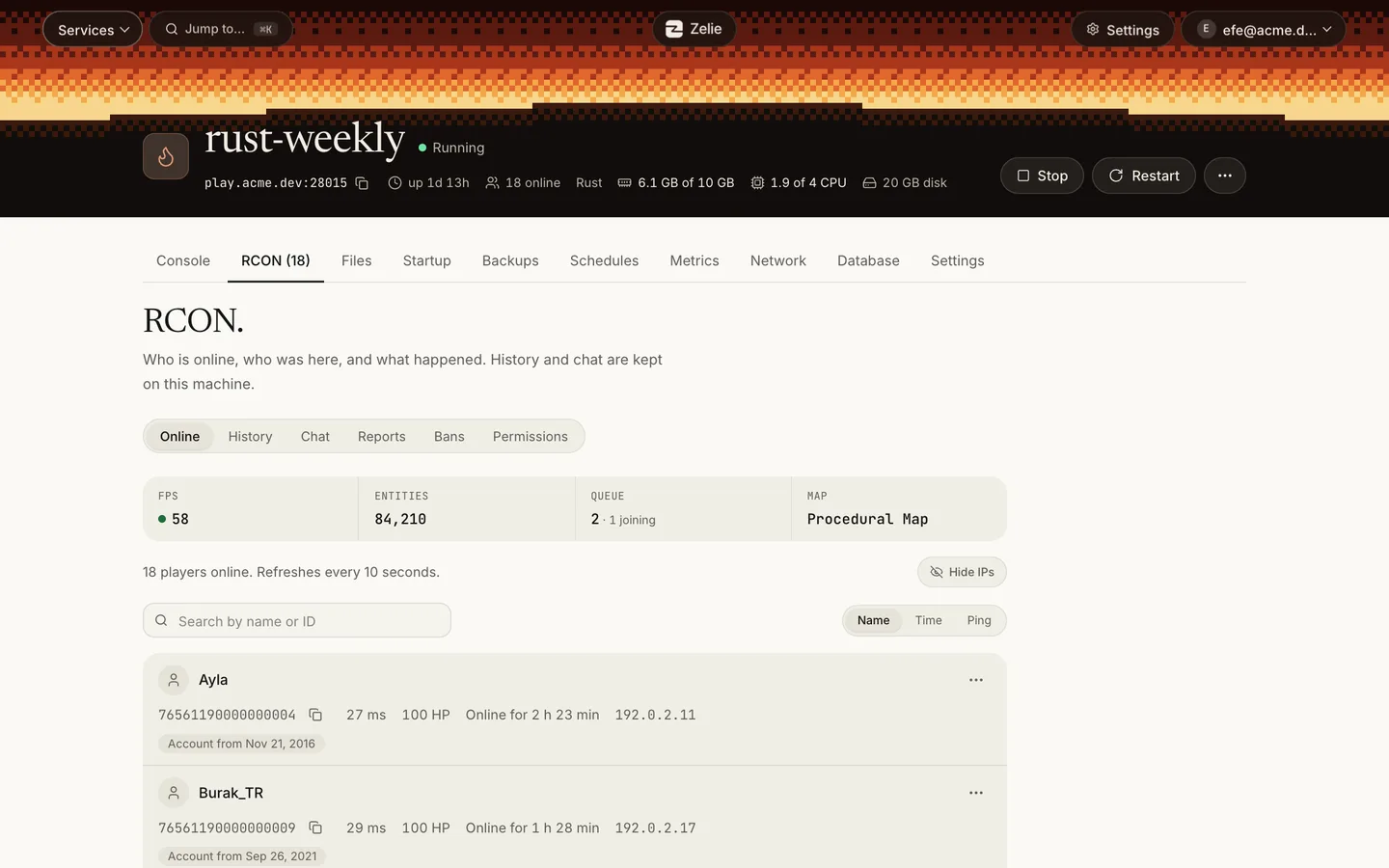
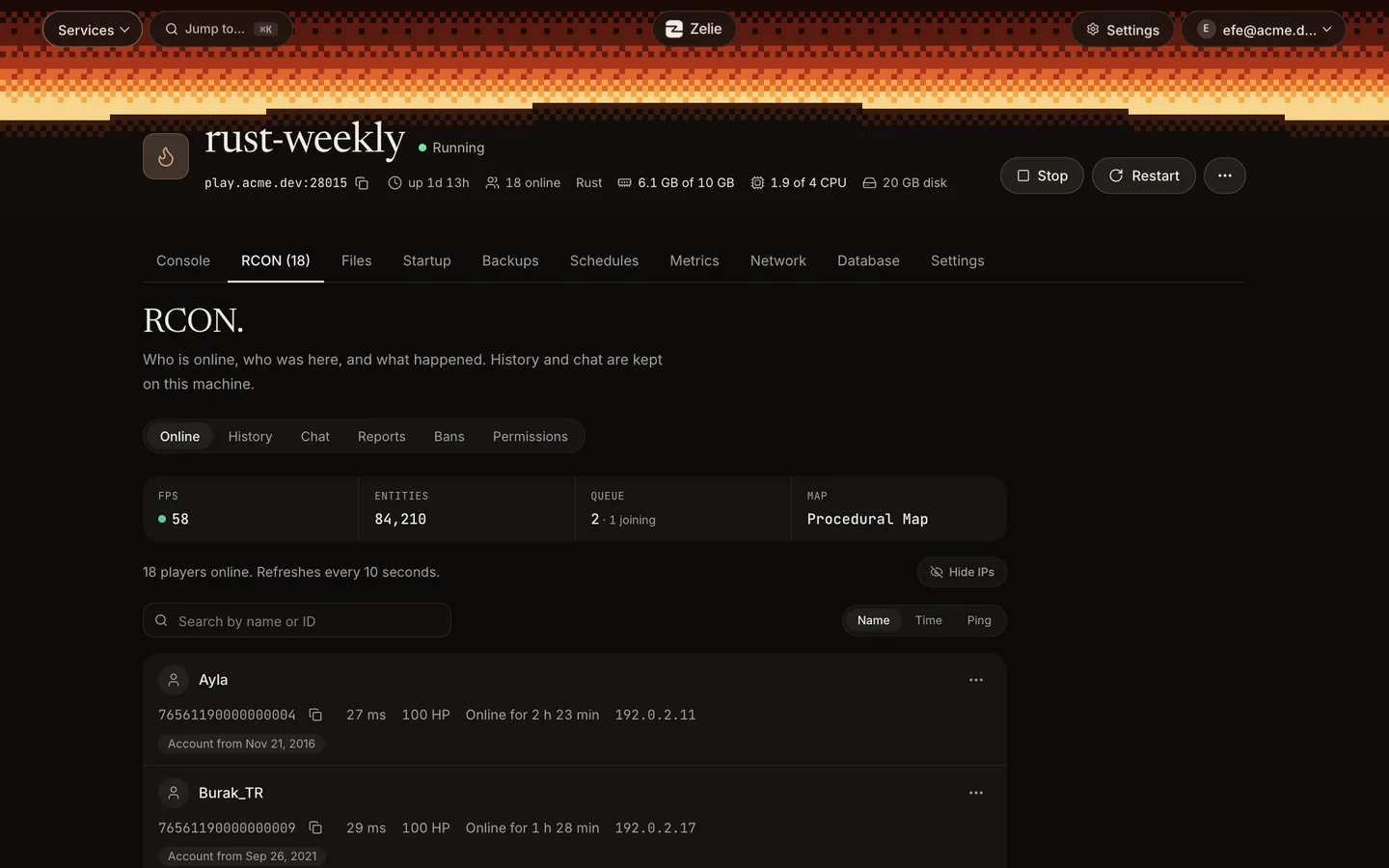
Who is on the server, in the panel
The Players tab shows who is online with ping, time online and address, which stays hidden until you show it. It also keeps everyone seen in the last 30 days with their visits and play time, and lists accounts that were seen on the same address.
Chat is kept for 7 days, global and team apart, and can be searched. You can kick and ban with a reason and an end date, and Zelie lifts the ban when it ends while the server runs. Notes on a player and a log of what admins did are there too. With a free Steam Web API key, players also show their VAC and game bans and the age of their account.
Zelie asks Rust over its WebRCON with the server’s own password, only while the tab is open. Nothing extra runs, and a stopped server costs nothing. F7 reports are not shown yet.
Owners and moderators can be changed whether the server is running or stopped. The Permissions tab manages Oxide and Carbon groups, permissions and plugins, so a role can be handed out without typing commands into the console.
Editing Oxide and uMod plugins in the browser
Rust plugins for Oxide (uMod) are single C# files. Upload them to the server’s plugin folder with the file manager or over SFTP, then open them in the editor. C# is coloured as you type, and so are JavaScript, TypeScript, Lua, JSON, YAML and config files.
Oxide’s own config and data files are JSON. When one has a mistake, the editor marks it in red with the line and the reason above the file, before you save it. Whether the server has Oxide installed depends on the egg you use, so check its variables on the Startup tab. server.cfg opens as a form, with the plain text a click away.
Steam build tracking and updates when nobody is playing
Rust updates often, and a server on an old build stops players with a newer client from joining. Zelie asks Steam once an hour which build is the latest and shows on the server’s page when it is behind.
If you let it, Zelie updates the game when nobody is playing. Keep a backup schedule, so there is a way back if a new build breaks a plugin.
World size, seed and a custom map
The egg’s variables are on the Startup tab, checked against the egg’s own rules and used on the next start. In the Rust egg they include settings such as the world size and seed, and the address of a custom map. Some eggs lock variables, and the lock holds for users who are not administrators.
Every settings form has a bar with Save, Reset and Undo as soon as something changes, so a wrong value is easy to take back.
How much memory and disk Rust needs
The game files alone are about 10 GB, and the server holds the whole map in memory. Zelie suggests 8 GB of memory and 30 GB of disk when you create a Rust server. Both can be changed later on the Settings tab.
That is a lot for a small VPS. If the machine also runs other servers, add up what they ask for before you start them all.
Crashes and clones
When the server crashes, Zelie reads its last lines and says why, so running out of memory shows up as the cause, not only as an exit code. A clone makes a new, stopped server with the same egg, settings and files, and new ports: a place to try a plugin before the live server gets it.
Backups and schedules
Backups of the server’s files run on a schedule, encrypted on the server, with a copy in any S3-compatible storage. Schedules can also run console commands, restarts and backups at cron times, one task after another.
A status note, since Rust servers are often public. Zelie is young and moving fast. Rust and the Steam update check have only run against stand-ins in Zelie’s tests so far. The Players tab’s RCON side, the online list, kicks and bans, has not yet been checked against a live Rust server. Keep backups of what matters. How Zelie differs from Pterodactyl and Pelican is in the comparison.
Questions
Can I see and ban players from the panel?
Yes. The Players tab lists who is online and who was seen in the last 30 days, shows chat, and can kick or ban with a reason and an optional end. It talks to the server over its WebRCON, only while the tab is open.
Does Zelie support Oxide or uMod plugins?
Zelie runs the Rust egg, and Oxide plugins are C# files in the server’s folder. You can upload them, edit them in the browser and keep them in backups. Installing Oxide itself depends on the egg’s variables.
Which ports does a Rust server need?
Four: the game port, the query port, the RCON port and the port of the Rust+ companion app. Zelie opens the ones you choose and closes them again when you delete the server.
How much RAM does a Rust server need?
Zelie suggests 8 GB of memory and 30 GB of disk. The server holds the whole map in memory, so a bigger world needs more.
Can Zelie wipe the server on a schedule?
Not as a feature of its own. Schedules can run console commands, power actions and backups at cron times.
Install Zelie
Zelie is in early development, and Free is open to everyone: make an account and install it on a server of your own. Pro, for your own server too, is on sale now at €4.49 a month or €44.90 a year. Business, for those who sell hosting, follows.